ComfyUI vs Flora and Krea for API models: which to pick

For API models, take ComfyUI for low-level control, a hosted canvas such as Flora or Krea Nodes for a browser with nothing to set up, or Genvas, free during the beta, to pay each provider directly with your own keys. Dee, who makes Genvas, wrote this page.

ComfyUI vs Flora, Krea and Figma Weave4 alternatives
GenvasFree (beta)
ComfyUIFree, open source; Comfy Cloud from $20 a month; Partner Nodes use prepaid Comfy credits
FloraFree ($0/mo); Starter $18, Pro $50, Max $200 per seat a month
Krea NodesFree tier; Basic $9 a month, Pro $35 a month
ComfyUI vs Flora, Krea and Figma Weave4 alternatives
GenvasFree (beta)
ComfyUIFree, open source; Comfy Cloud from $20 a month; Partner Nodes use prepaid Comfy credits
FloraFree ($0/mo); Starter $18, Pro $50, Max $200 per seat a month
Krea NodesFree tier; Basic $9 a month, Pro $35 a month
On this page

How each tool handles API models

GenvasFree (beta)

Genvas is a desktop app that runs hosted API models on a node canvas, and you pay each model provider directly with your own key. It is free during the beta, with no subscription.

Setup is a download and a key added under Settings, Providers. There is no account and no cloud: nothing is uploaded to the maker, results appear on the board, and Settings, Export, Export folder sends files to a folder you choose.

The model list has more than 100 models across image, video, audio and 3D. Veo 3.1 runs on a fal.ai key and Kling 4.0 on a Kie.ai key. Most video models take an image made on the same board as a start frame. A dry run prices a board before it spends anything, and agent runs can use OpenAI Batch at half price.

Genvas ships a local MCP server. Claude Code and Codex connect from Settings, General, Agents, and any other MCP agent can connect too.

What it does not do: the source is not public yet, Replicate is not a provider, and an agent can use it only while the app is open. Upscaling and background removal need a Kie.ai key. The setting “Ask before a run costs more than” applies only to runs you start in the app, so agent runs stop only at the daily limit.
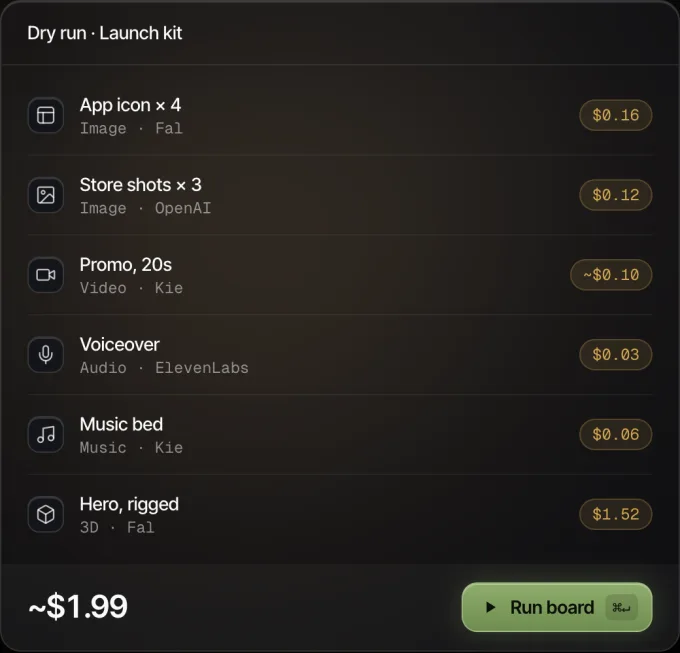
Genvas dry run of a launch kit board: six nodes with their prices, about $1.99 in all, and a Run board button.
Every node shows its price before it runs.

ComfyUIFree, open source; Comfy Cloud from $20 a month; Partner Nodes use prepaid Comfy credits

ComfyUI is free, open-source node software. You can run it locally with Comfy Desktop or in a browser with Comfy Cloud. Locally, that means managing a GPU, model files and custom-node dependencies. Comfy Cloud plans start at $20 a month and reach $700 for Team.

To call hosted closed-source API models such as OpenAI, Kling and Luma inside a graph, ComfyUI uses Partner Nodes, which require logging in to a Comfy account and buying prepaid ComfyUI credits under Settings, Credits. Programs can also drive a local graph directly: every workflow is a JSON graph, and the local server exposes it over a websocket API. Turning a graph into a stable HTTP endpoint is possible, though it takes dedicated engineering work.

FLORA’s comparison notes that ComfyUI runs locally for a single user and gives lower-level control over every sampling and pipeline step. People who train their own checkpoints, depend on specific custom nodes or need to work offline have a reason to stay with it.

FloraFree ($0/mo); Starter $18, Pro $50, Max $200 per seat a month

Flora is a hosted node canvas that runs in a browser, and it is free to start with no hardware to supply. It manages 50+ models, such as FLUX and Veo, under one plan. On FLORA’s pricing page, Free is $0 a month for one seat, three active projects, text and image models, and up to 17 free generations capped at $2.50; Starter is $18 per seat a month and adds video models, API and MCP access, and unlimited projects; Pro is $50 per seat a month and Max is $200 per seat a month.

Techniques package a workflow so a teammate can run it in the browser. The batch node fans one workflow out across prompts, references and ratios. Flora also lists workspaces, roles, brand kits, audit and budgets per workspace or person, and an agent on the canvas. You own the output, and FLORA says your data is never used to train models.

basedlabs.ai reports a limited programmatic surface on lower plans, while Starter and above include API and MCP access. 8frame.co notes that generation can queue behind demand at peak times and some controls are abstracted. FLORA trades some of ComfyUI’s low-level depth for zero setup, managed models and team features.

Krea NodesFree tier; Basic $9 a month, Pro $35 a month

Krea Nodes is the node tool inside Krea, a hosted suite. It chains Krea’s generation, enhancement and upscaling tools, runs models in parallel and shares templates, with App Builder, Nodes Agent and LoRA training alongside. Krea spans 64+ models, and its upscaler reaches 22K on images.

Generations are paid in compute units. Free gives 100 a day, Basic is $9 a month for 5,000 units and some video models, and Pro is $35 a month for 20,000 units and all video models. Real-time generation updates the image as you sketch.

basedlabs.ai reports that Krea is built for hands-on creation and that its programmatic story is thinner than its editor. 8frame.co says its team collaboration and video production chain are lighter than tools built for those first.

Side by side

Genvas details were read from version 1.3.9 on 9 and 10 November 2026; ComfyUI Partner Nodes and FLORA seat pricing were checked on vendor documentation and pricing pages on 12 November 2026, alongside third-party reviews dated 25 May to 10 November 2026.

Product Price Where it runs Lacks, by its source Best for
Genvas Free (beta) Desktop: Mac (Apple silicon), Windows 10 and 11 (x64), Linux (.deb, x64) Open source soon; Replicate is not a provider; an agent needs the app open API models billed by the provider on your key
ComfyUI Free, open source; Comfy Cloud from $20 a month; Partner Nodes use prepaid Comfy credits Your own GPU, or Comfy Cloud in a browser Local runs need your own GPU and model downloads; single-user Own checkpoints, custom nodes, offline work
Flora Free ($0/mo); Starter $18, Pro $50, Max $200 per seat a month Hosted, in a browser Peak-time queuing; some sampling controls abstracted Teams sharing workflows in a browser
Krea Nodes Free tier; Basic $9 a month, Pro $35 a month Hosted Programmatic access thinner than its editor; lighter team collaboration Work built around Krea’s own tools

Figma Weave, formerly Weavy, is a hosted node canvas with 50+ models across image, video and 3D that pays off most if you already design in Figma.

Which one to pick

  • Pick Genvas if you want to pay each provider at its own price with your own keys, see a run’s price before it starts, or have Claude Code or Codex build and run boards on your computer.
  • Pick ComfyUI if you train your own checkpoints, depend on specific custom nodes or need to work offline, or if you want control over every sampling and pipeline step and will maintain the setup.
  • Pick Flora if you want a browser canvas with Techniques and a batch node, plus workspaces, roles and brand kits for a team.
  • Pick Krea Nodes if Krea’s own generation, enhancement and upscaling tools already anchor your workflow.

More guides & comparisons

7 AI image apps that show the cost before a run, ranked

Seven apps ranked by how exactly they price a job before it runs: Genvas (free beta) prices a whole board; the rest quote credits or tokens.

Best AI canvas apps for Mac, compared for images and video

Eight AI canvas apps compared by price, platform and models. Genvas, written by its maker, ranks first and is free during the beta; OpenCanvas AI is free.

Flora or Weavy alternative with no subscription: Genvas

Genvas is a Flora and Weavy alternative with no subscription. Free (beta). Also covers NodeTool, ComfyUI and Imaginode.

Start your first board.

Add a key and make something in a minute.

Free during beta. Open source soon, under AGPL-3.0.

No subscriptionYour keys, your filesMac, Windows and Linux