Image apps that show the cost before you run a job

Genvas is a desktop app for AI media that prices a whole board before it spends anything, and it is free during the beta. Dee, who makes Genvas, wrote this page and ordered it by how exact the pre-run price is. Take Alphaize if you want a credit quote to confirm before an edit, Versely if you want an agent to total a mixed batch in credits, Upscayl if you are a new user who wants free credits, and Higgsfield, Netus AI or Kittl if a cost shown before each generation is enough.

Apps that show the cost before a run7 alternatives
GenvasFree (beta)
Alphaize$15 to $79 a month
VerselyFree to start
UpscaylFree credits for new users
HiggsfieldSubscription credits
Netus AIFrom $7 a month
KittlPlan tokens
Apps that show the cost before a run7 alternatives
GenvasFree (beta)
Alphaize$15 to $79 a month
VerselyFree to start
UpscaylFree credits for new users
HiggsfieldSubscription credits
Netus AIFrom $7 a month
KittlPlan tokens
On this page

How the apps compare

The comparison uses four criteria: where the price appears before a run, the unit it is in, how the app is paid for, and one limit its source states. A price for the whole job ranks first. A credit total for the whole job comes next, and a rate shown per image or per model comes last. Genvas ranks first because its dry run prices a whole board and spends nothing, and its estimate for one generation is in US dollars, while every other entry quotes credits or tokens. Genvas details come from version 1.3.9. Details for the other apps come from pages dated or read between 24 March 2026 and 10 November 2026.

Product Price Pre-run price shown as Best for
Genvas Free (beta) Whole board, dry run Pricing a multi-step job before it runs
Alphaize $15 to $79 a month Plan with credit cost, confirmed first Checking an edit’s cost before approving it
Versely Free to start Itemized credit total and balance Pricing a mixed batch in one question
Upscayl Free credits for new users Credit total per request Trying a pre-run price at no cost
Higgsfield Subscription credits Cost on the Generate button Several models on one balance
Netus AI From $7 a month Credit rate per image, per model Comparing rates across 14 models
Kittl Plan tokens Token cost in the model picker Generating on a design canvas

Seven apps ranked by how exact the pre-run price is

GenvasFree (beta)

Genvas is a desktop app where you build image, video, audio and 3D jobs on a node canvas, and a dry run prices the whole board and spends nothing. In the app, the price of a run shows before you start it. The estimate tool returns the price of a single generation in US dollars. You use your own provider keys and pay the provider directly, with nothing added by Genvas.

It is free during the beta and goes open source soon, under AGPL-3.0. It runs on Mac (Apple silicon), Windows 10 and 11 (x64) and Linux (.deb, x64).

Best for pricing a multi-step board before you or an agent such as Claude Code or Codex runs it. A Daily limit under Settings, Spending refuses paid agent calls once the last 24 hours of spending reach it. The limit to know: the “Ask before a run costs more than” setting applies only to runs you start in the app, so for agent runs the daily limit is the only stop.
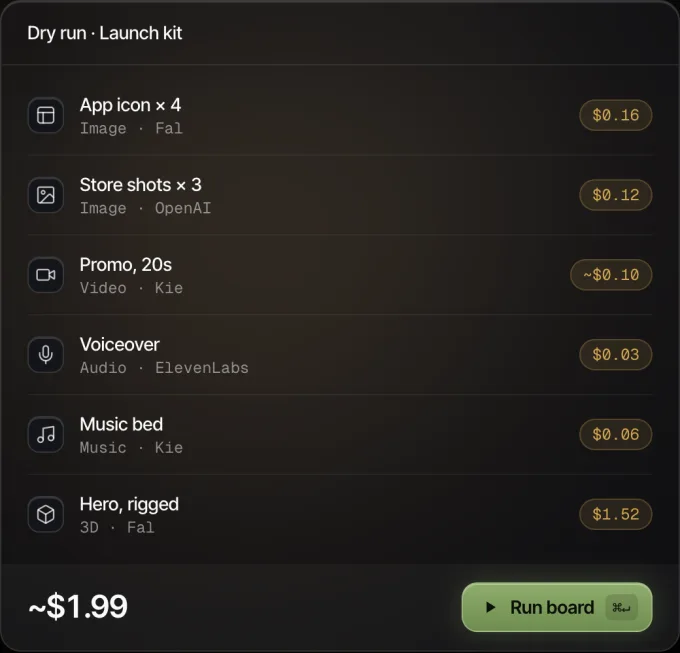
Genvas dry run of a launch kit board: six nodes with their prices, about $1.99 in all, and a Run board button.
Every node shows its price before it runs.

Alphaize$15 to $79 a month

Alphaize is a browser-based image editor with an agent workspace that shows a plan and its credit cost before anything runs, then generates only after you confirm. The quote is frozen before execution, and every result is saved as a version in the project. Pricing is a monthly or yearly credit subscription from $15 to $79 a month across three plans, plus $12 once for credits that never expire. These figures come from a directory listing of the vendor’s pricing page.

Best for checking what an edit you describe will cost before you approve it. There is no free tier.

VerselyFree to start

Versely is a studio with 60+ models for video, image, voice, music and lipsync, and its agent returns an itemized credit estimate for planned generations with your current balance beside it. You ask in plain English, for example how much 5 images and a 10-second video would cost. The estimate itself charges no credits. Versely is free to start on the web and on iPhone with one account.

Best for pricing a mixed batch of images, video and music in one question. The agent needs you to say what you plan to generate so it can total the cost.

UpscaylFree credits for new users

Upscayl’s AI Image Generator turns a prompt into an image and shows your available credits and the total cost before generation, including when you request several images at once. New users get free credits, and each image uses 4 credits. It runs online and offers Nano Banana 2, Nano Banana Pro, Nano Banana and GPT Image 2.

Best for trying a pre-run price at no cost. A prompt makes up to four images.

HiggsfieldSubscription credits

Higgsfield is a creative suite that offers Soul 2.0, Nano Banana 2.1, Seedream 5.0 Pro and other models on one subscription and one credit balance, and its product blog notes that the credit cost shows on the Generate button before you confirm. One 2K Soul 2.0 image costs 0.125 credits.

Best for one-off generations across several models on a single balance. The Generate button shows the cost of that single step rather than a total across a multi-step board.

Netus AIFrom $7 a month

Netus AI offers 14 image models from OpenAI, Google and xAI on one credit balance, and each model shows its per-image credit rate before you generate. The rate depends on the model: GPT Image 2.6 Flare is listed at 6 to 63.3 credits, and Grok Imagine at 6. Plans run from $7 a month for 500 credits to $65 for 8,000, and top-ups start at $4. Editing costs the same as the first render on that model, and it runs in the browser.

Best for comparing per-image rates across 14 models. Image generation needs a paid plan, and the Free plan covers chat only.

KittlPlan tokens

Kittl’s AI Image Generator makes images on a design canvas, and the model picker lists the token cost of each model, shown before you generate. Generating draws tokens from your Kittl subscription plan in the web editor.

Best for picking a lighter model for a draft and a higher-quality one for the final. On a Free plan your generated images are public, and only paid plans can keep them private.

Which one to pick

  • Pick Genvas if you want a whole board priced before anything runs, if you want to pay providers directly with your own keys, or if an agent runs your jobs and you want a daily spending limit.
  • Pick Alphaize if you want a credit quote you confirm before an edit runs and a monthly credit plan suits you.
  • Pick Versely if you want to ask an agent in plain English what a mix of images, video and music will cost.
  • Pick Upscayl if you want to try a pre-run credit total free as a new user.
  • Pick Higgsfield if you want several image models on one credit balance, with the cost on the Generate button.
  • Pick Netus AI if you want to compare per-image credit rates across 14 OpenAI, Google and xAI models.
  • Pick Kittl if you want to generate on a design canvas and see each model’s token cost first.

More guides & comparisons

Best AI canvas apps for Mac, compared for images and video

Eight AI canvas apps compared by price, platform and models. Genvas, written by its maker, ranks first and is free during the beta; OpenCanvas AI is free.

Run FLUX, Kling and Seedance on your fal.ai key in Genvas

Genvas is a desktop app that runs FLUX, Kling and Seedance on your own fal.ai key. It has no Replicate option. Free during beta.

Krea Nodes alternatives: Genvas, Wireflow, FLORA, ComfyUI

Krea Nodes comes with Pro at $35 a month. Genvas (free beta), Wireflow, FLORA and ComfyUI compared by price and fit. Written by the maker of Genvas.

Start your first board.

Add a key and make something in a minute.

Free during beta. Open source soon, under AGPL-3.0.

No subscriptionYour keys, your filesMac, Windows and Linux