Best AI canvas app for Mac: images and video

Genvas is a desktop node-canvas app for AI images and video on Apple silicon Macs, Windows and Linux, free during the beta. Dee makes Genvas and wrote this list, ranking installable apps above browser tabs. OpenCanvas AI is the free, open-source option; Draw Things suits Intel Macs and offline use.

Desktop AI canvas apps8 alternatives
GenvasFree (beta)
OpenCanvas AIFree, open source
SHUO CanvasPaid software activation fee
RangyFree to start
Draw ThingsFree; Draw Things+ $8.99 a month
ValtzFree
Cowart CanvasMIT licence
MorphicCredits, free to try
Desktop AI canvas apps8 alternatives
GenvasFree (beta)
OpenCanvas AIFree, open source
SHUO CanvasPaid software activation fee
RangyFree to start
Draw ThingsFree; Draw Things+ $8.99 a month
ValtzFree
Cowart CanvasMIT licence
MorphicCredits, free to try
On this page

Criteria, date checked and summary table

The list ranks tools for someone who wants a canvas or node app installed on their own computer. The checks are a download for your platform, a canvas or node workspace, images and video together, how you pay, and the models or providers reached. Installable native apps with clear platform downloads rank above browser-only tools. Details on the other tools come from their own pages, read on 10 November 2026; Genvas details are from version 1.3.9.

Product Price Platforms listed Best for
Genvas Free (beta) Mac (Apple silicon), Windows 10/11 (x64), Linux (.deb, x64) Boards run by you or an agent, with your own keys
OpenCanvas AI Free, open source Mac, Windows, Linux Free node editor on all three systems
SHUO Canvas Paid software activation fee Mac (M series), Windows (.exe) RunningHub and ComfyUI workflows
Rangy Free to start Mac, Windows Replicate or Kie.ai account holders
Draw Things Free; Draw Things+ $8.99 a month Mac (Apple silicon and Intel), iPhone, iPad Offline generation on Intel Macs
Valtz Free Mac (Apple silicon, macOS 26.2+) Local models, no cloud API
Cowart Canvas MIT licence Local browser server (Node.js 22+, macOS recommended) Marking edits on images
Morphic Credits, free to try Web studio Team review of shots

Desktop and browser AI canvas tools, ranked

GenvasFree (beta)

Genvas is a desktop app for making images, video, audio and 3D models on a node canvas. It is free during the beta and goes open source soon. Downloads cover macOS on Apple silicon, Windows 10 and 11 (x64) and Linux (.deb, x64). You use your own keys for providers such as OpenAI, Gemini, fal.ai and Kie.ai and pay each one directly. Results appear on the board, and files go to an export folder you set in Settings. The more than 100 models include Veo 3.1, Kling 3.0 and FLUX.3, and an image from the board can feed a video model as its start frame. Claude Code or Codex can build and run boards through its MCP server, and a dry run prices a board first. Genvas ranks first on the criteria because its three downloads, node canvas and image-to-video on one board all match. Best for boards that you or an agent run on your own keys. Limit: the only Mac download is for Apple silicon.
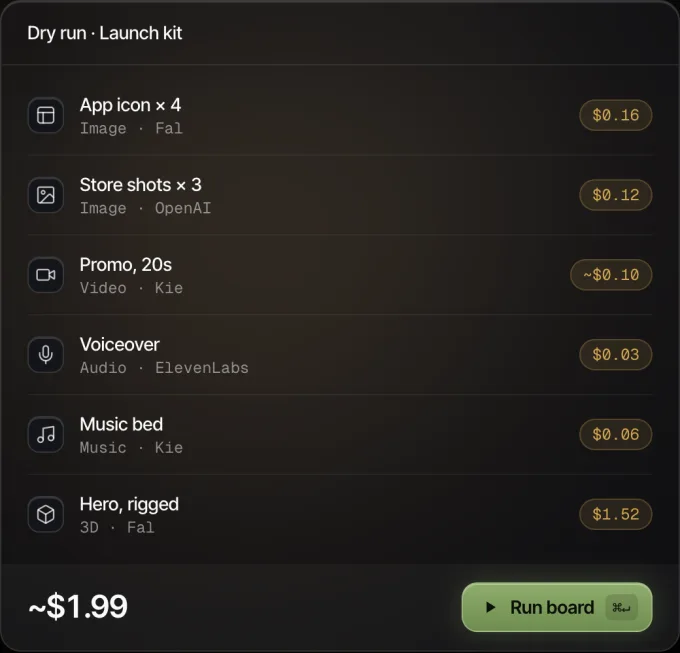
Genvas dry run of a launch kit board: six nodes with their prices, about $1.99 in all, and a Run board button.
Every node shows its price before it runs.

OpenCanvas AIFree, open source

OpenCanvas AI is an open-source node editor for image and video workflows, with upscale, inpaint, background remove and image-to-video nodes. It is free, with no subscription. It installs on Mac, Windows and Linux, runs on your computer and uses your own fal.ai or Replicate keys. Best for a free desktop node editor on all three systems. Limit: provider keys are limited to fal.ai and Replicate.

SHUO CanvasPaid software activation fee

SHUO Canvas is a node canvas connecting text, image, video and audio generation, and it imports RunningHub and ComfyUI workflows, local or cloud. It charges a one-time software activation fee and nothing per model call. The download is public, while the software itself is closed source. Installers cover Windows (.exe) and macOS M series (.dmg or .zip). You add keys in Settings from platforms such as RunningHub, APImart and Volcengine. Best for people who already use RunningHub or ComfyUI workflows. Limit: the only Mac installer listed is for M series chips, with no Linux installer.

RangyFree to start

Rangy is a standalone desktop app for Mac and Windows that generates images and video on a freeform canvas, where an agent picks the model and writes the prompt. It is free to start on your own Replicate or Kie.ai account, with Seedream 4.5 at about $0.04 an image. More than 30 models include Wan 3.0, Seedance 2.5 and MiniMax H3. Best for a Mac or Windows user with a Replicate or Kie.ai account. Limit: desktop downloads cover Mac and Windows only, with no Linux build.

Draw ThingsFree; Draw Things+ $8.99 a month

Draw Things makes images and video on your Mac, iPhone or iPad with no internet needed, and includes an Infinite Canvas. Local use is free, an optional Community tier adds free cloud compute, and Draw Things+ costs $8.99 a month. It runs on Apple silicon and Intel Macs from macOS 12.4, with Stable Diffusion and Flux.1 among its models. Best for an Intel Mac or offline work. Limit: Apple platforms only (Mac, iPhone and iPad).

ValtzFree

Valtz is a native Mac app that makes images, video, voice and music on your machine through the Vpipe engine, with a timeline editor and no cloud AI API needed. It is a free download from GitHub Releases, and its source code is available. A 16GB Apple silicon Mac can run image generation and supported HD video. Best for local generation on a recent Apple silicon Mac. Limit: releases need macOS 26.2 or later on Apple silicon only.

Cowart CanvasMIT licence

Cowart Canvas is a canvas for marking edits on AI images and creating image-to-video tasks, and it runs in a browser tab from a local server. It is released under the MIT licence. You need Node.js 22 or newer and npm, and its background service scripts target macOS. Image providers include fal.ai, Alibaba Wanxiang, Volcengine Ark and Kling. Best for marking exact spots on an image before an edit. Limit: it needs git, Node.js 22+ and npm to set up locally.

MorphicCredits, free to try

Morphic Canvas is an infinite board for generating images and clips and comparing them side by side, with inpaint, outpaint and shared Documents. Generation uses credits at each model’s usual rate, with a free tier to try. Models listed include Seedance 2.5, Wan 3.0 and Seedream 5.0. Live team editing needs the Pro plan or above. Best for a team reviewing shots together. Limit: runs as a hosted studio in the browser, and video cutting happens in a separate editor, Compose.

Which one to pick

Pick Genvas if you want a desktop canvas on Apple silicon, Windows or Linux that runs on your own provider keys, or if you want Claude Code or Codex to build and run your boards.

Pick OpenCanvas AI if you want a free, open-source node editor on Mac, Windows or Linux and your keys come from fal.ai or Replicate.

Pick SHUO Canvas if you already run RunningHub or ComfyUI workflows and have an M series Mac or a Windows PC.

Pick Rangy if you want a Mac or Windows app where an agent writes the prompts and you hold a Replicate or Kie.ai account.

Pick Draw Things if you have an Intel Mac or want to generate offline for free.

Pick Valtz if you have an Apple silicon Mac on macOS 26.2 or later and want models to run locally with no cloud AI API.

Pick Cowart Canvas if you are comfortable with npm and want an MIT-licensed local browser tool for marking image edits.

Pick Morphic if you want a team to edit one board live on the Pro plan or above.

More guides & comparisons

Run FLUX, Kling and Seedance on your fal.ai key in Genvas

Genvas is a desktop app that runs FLUX, Kling and Seedance on your own fal.ai key. It has no Replicate option. Free during beta.

MCP servers for image and video in Claude Code, compared

Seven MCP servers for image and video in Claude Code, ranked by what you see before you pay. Written by the maker of Genvas, which is free during the beta.

Price per AI image and video run on Kie.ai and fal.ai keys

Video clips $0.14 to $2.37 and images $0.004 to $0.15 across Kling, Seedance, Veo, FLUX and more, estimated in Genvas 1.3.9 on 10 November 2026.

Start your first board.

Add a key and make something in a minute.

Free during beta. Open source soon, under AGPL-3.0.

No subscriptionYour keys, your filesMac, Windows and Linux