Genvas is a desktop app for AI images, video, audio and 3D on a node canvas, with no subscription, on your own provider keys. It is free during the beta. Dee, who makes Genvas, wrote this page. Take NodeTool or ComfyUI if you want open-source code today, or Imaginode for browser credits that never expire.
Dee makes Genvas
Flora and Weavy4 alternatives
GenvasFree (beta)
NodeToolFree, AGPL-3.0
ComfyUIFree locally; Comfy Cloud from $16 a month billed yearly
Imaginode$7 top-up for 300 credits, or $17 a month Starter
Flora and Weavy4 alternatives
GenvasFree (beta)
NodeToolFree, AGPL-3.0
ComfyUIFree locally; Comfy Cloud from $16 a month billed yearly
Imaginode$7 top-up for 300 credits, or $17 a month Starter
Figma Weave Starter is $24 a month for 1,500 credits. Flora’s paid plans run from $18 to $200 per seat a month and draw on a shared dollar pool whose size Flora does not publish.
Weave credits expire. On Starter and Free, unused credits do not roll over. Professional and Team keep up to three times the monthly amount, Max keeps up to four times, and anything above that is lost. Top-ups last 12 months. A paid Figma plan does not include Weave either, because the two are billed separately.
Alternatives with no monthly plan
Four options avoid a monthly plan: Genvas, NodeTool, ComfyUI run locally, and Imaginode’s credit top-ups.
GenvasFree (beta)
Genvas is a desktop app that makes AI images, video, audio and 3D models on a node canvas. It is free during the beta and goes open source soon, under AGPL-3.0. It runs on Mac (Apple silicon), Windows 10 and 11, and Linux. You pay each provider directly with your own key, and Genvas adds nothing on top. There is no subscription. It shows the price of a run before you start it, and files save to a folder on your computer. Claude Code, Codex and other MCP agents can build and run boards. If you want open-source code today, NodeTool is free. Replicate is not a supported provider, and upscaling and background removal need a Kie.ai key.
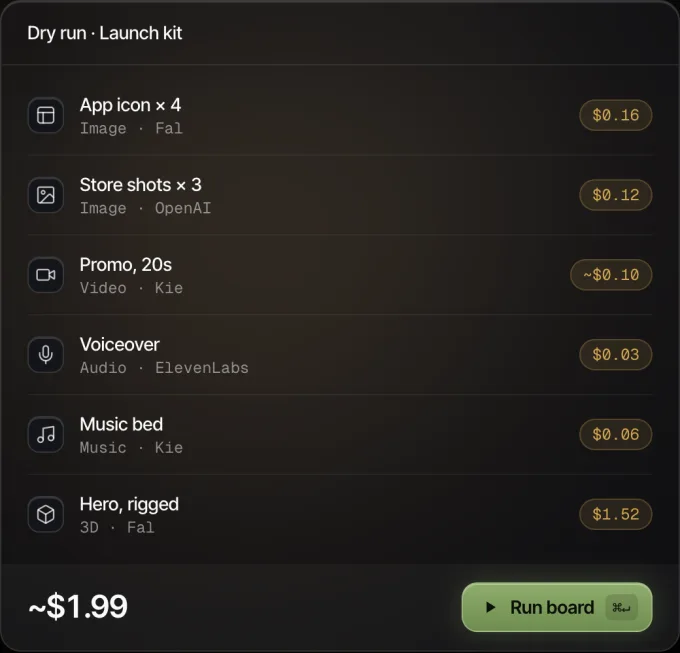
Every node shows its price before it runs.
NodeToolFree, AGPL-3.0
NodeTool is an open-source creative workspace that combines an AI video editor and an agent with node-based workflows. It is free under AGPL-3.0 and runs on macOS, Windows and Linux. You connect your own provider keys, or run supported open-weight models on your own computer through Ollama and MLX, and it adds nothing to provider prices. It suits anyone who wants open code and no licence fee. Provider charges are separate, and local models use your hardware and electricity.
ComfyUIFree locally; Comfy Cloud from $16 a month billed yearly
ComfyUI is a node-based tool for building generation workflows with open-weight models, custom nodes and LoRAs. It is free and open source (GPL-3.0) when it runs locally on your own GPU, with more than 60,000 nodes. The hosted Comfy Cloud is a subscription, from $16 a month billed yearly, with five free runs to test. It suits technical users who want the most control over models and graphs. Expect a learning curve.
Imaginode$7 top-up for 300 credits, or $17 a month Starter
Imaginode is a node canvas in the browser with more than 100 models, including Kling, Seedance, Veo 3.1 and ElevenLabs voices. A $7 top-up buys 300 credits that never expire, with no subscription; Starter at $17 excluding tax for 900 credits is the monthly option. Each generation shows its price before you click, and failures are refunded. It suits a solo creator who wants to pay per generation and install nothing. It is single-user only, with no Figma integration and no Runway or Ideogram models.
Prices and platforms side by side
This table compares Genvas, NodeTool, ComfyUI and Imaginode on price, platform and how runs are paid. Details for the other three products come from pages dated 26 September 2026 to 9 November 2026; check them before you buy.
Product
Price
Runs on
How runs are paid
Best for
Genvas
Free (beta)
Mac, Windows, Linux
Your own provider keys, paid to the provider
Agent-built boards without a subscription
NodeTool
Free, AGPL-3.0
macOS, Windows, Linux
Your own keys, or local models
Open code and local models
ComfyUI
Free locally; Comfy Cloud from $16 a month billed yearly
Your own GPU, or hosted
Your hardware, or a Cloud subscription
Full control with open-weight models
Imaginode
$7 top-up for 300 credits, or $17 a month Starter
Browser
Credits
Solo creators paying per generation
Models in Genvas 1.3.9 and the key each needs
Genvas 1.3.9 has more than 100 models across image, video, audio and 3D, and each one runs through a provider key you add. Image models include FLUX.3 and FLUX.2 (fal.ai key), Nano Banana (Kie.ai, Google Gemini or fal.ai key), GPT Image (OpenAI or Kie.ai key), Seedream 5 and Qwen Image 3 (Kie.ai key) and Krea v3 (fal.ai key).
Video models include Veo 3.1 (fal.ai key), Kling 3.0 (Kie.ai, Higgsfield or fal.ai key), Kling 4.0 (Kie.ai key), Seedance 2.0 and 2.5 (Kie.ai, Higgsfield or fal.ai key), Wan 3.0 (Higgsfield, fal.ai or Kie.ai key), Grok Imagine, Luma Ray 3.2, Vidu Q4, PixVerse V6 and MiniMax H3. Most take an image as the start frame and several also take an end frame, so an image made on the board can feed a video model on the same board.
Audio covers ElevenLabs and Fish Audio voices, Gemini text to speech, Suno v6 and ElevenLabs Music for music, and sound effects models. For 3D there are Meshy, Tripo, Hunyuan 3D, Rodin and Trellis (fal.ai key). Full-screen viewers let you crop, split, upscale, trim and compose.
What provider-billed runs cost
With your own keys you pay the provider’s list price for each run. As a sense of scale, NodeTool’s page quotes Kie.ai list prices: a Seedream 5 Lite still costs $0.03 and five seconds of Seedance 2 costs $1.03. Neither NodeTool nor Genvas adds anything on top of what the provider charges.
Agent runs in Genvas can use OpenAI Batch at half price. Draft mode previews OpenAI images cheaply. When an agent needs three or more icons, UI parts or sprites in one style, it makes one 4K sheet and splits it instead of running one job each.
Which one to pick
Pick Genvas if you want one payment and then only provider bills, if Claude Code, Codex or another MCP agent should build and run your boards, or if you want every file saved to a folder on your computer.
Pick NodeTool if you want free, open-source desktop software that can also run local models.
Pick ComfyUI if you want the most control, with open-weight models and custom nodes, and accept a learning curve.
Pick Imaginode if you work alone, want a browser tool with nothing to install, and prefer credits that never expire to a licence.
Stay with Flora or Figma Weave if
Staying put is the right call when one of these describes you:
Your work lives in Figma Design, where Weave tools sit in the design panel for paid Figma plans.
You edit between generation steps, and you use Weave’s curves and levels, alpha masks and array nodes.
Several people share one canvas, and you want the real-time collaboration and pooled team usage that Flora includes from Starter.
A free plan covers you: Weave Free gives 150 credits a month and Flora Free gives up to 17 generations.