MCP servers for image and video in Claude Code

Genvas is a desktop app where Claude Code builds a visible image and video board and prices it with a dry run. It is free during the beta. Dee, who makes Genvas, wrote this page and ordered it by what you see before money is spent. For a one-off image, take image-create-mcp or fal.

MCP servers for images and video7 alternatives
GenvasFree (beta)
falfal credits
ShotstackCredits, API key
ElevenLabsWorkspace credits
comfyui-mcpNo price stated
Ambience AIPremium, Team or Business plan
image-create-mcpMIT licence, no price stated
MCP servers for images and video7 alternatives
GenvasFree (beta)
falfal credits
ShotstackCredits, API key
ElevenLabsWorkspace credits
comfyui-mcpNo price stated
Ambience AIPremium, Team or Business plan
image-create-mcpMIT licence, no price stated
On this page

What the list compares

This list ranks each MCP server by how much you see before money is spent: a server that shows a board or job and a price before the run sits above one that only returns a file. Details of the other products come from their own pages and repositories, read on 10 November 2026; Genvas details are from version 1.3.9.

Product Price Best for
Genvas Free (beta) Seeing the board and its price before a run
fal fal credits Checking a model’s price in chat
Shotstack Credits, API key Video edits previewed before rendering
ElevenLabs Workspace credits Images, video and voiceover on one Flow
comfyui-mcp No price stated Local models and ComfyUI workflows
Ambience AI Premium, Team or Business plan Media saved to an Ambience AI library
image-create-mcp MIT licence, no price stated A one-off image from your own endpoint

Servers for image and video generation in Claude Code

GenvasFree (beta)

Genvas is a desktop app that makes images, video, audio and 3D models on a node canvas, and its local MCP server lets Claude Code build and run the boards. Version 1.3.9 lists more than 100 models, among them FLUX.2, GPT Image, Veo 3.1 and Seedance 2.5. You use your own provider keys, and Genvas adds nothing on top of their price.

The agent builds a board with create_workflow, prices it with run_workflow set to dryRun, then runs it and polls run_status. The dry run spends nothing, which is why Genvas sits first here: you see the board and the price before money moves. Agent runs stop only at the daily limit in Settings, Spending; the ask-before setting covers only runs you start in the app.

It is free during the beta and goes open source soon. Genvas runs on macOS on Apple silicon, Windows 10 and 11 (x64) and Linux (.deb, x64). To add it, press Connect on the Claude Code row under Settings, General, Agents, then start a new Claude Code session. Best for watching a board get built and seeing its price first.

The limit: Genvas is a paid desktop app and has to be open, and a closed app gives the agent the message “Genvas isn’t running”. For a one-off image, image-create-mcp is the better pick.
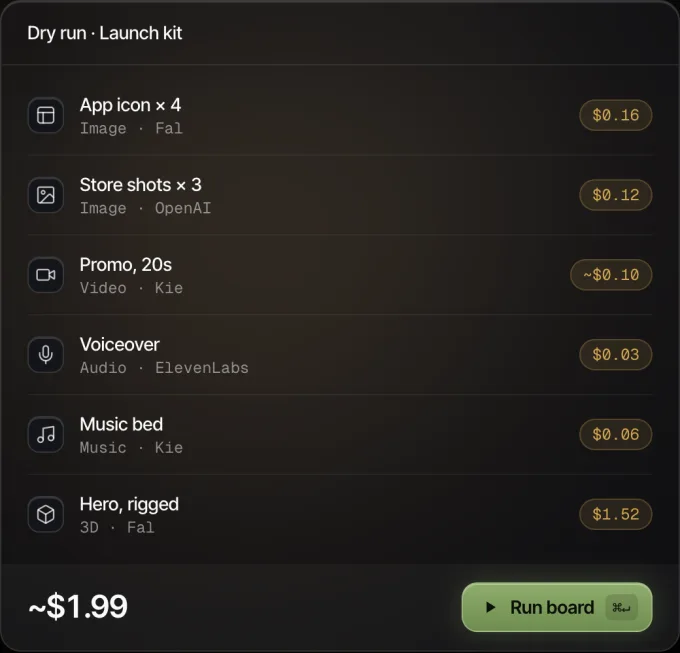
Genvas dry run of a launch kit board: six nodes with their prices, about $1.99 in all, and a Run board button.
Every node shows its price before it runs.

falfal credits

The fal MCP server lets Claude Code find models, check schemas and pricing, upload inputs and run image, video and audio generations. Add it with claude mcp add --transport http --scope user fal https://mcp.fal.ai/mcp-relay and authenticate with /mcp. The one-command installer runs on macOS or Linux. You pay in fal credits, and the page states no licence. The get_pricing tool returns a model’s price before you run it. Best for checking cost from the chat.

The limit: the page says its example prompts ask the assistant to request approval but add no server-side approval gate.

ShotstackCredits, API key

The Shotstack MCP server composes and renders videos from natural language. Add it with claude mcp add --transport http shotstack https://mcp.shotstack.io, then complete OAuth, or pass an x-api-key header for headless use. Chat clients mount an inline Studio canvas where you click Render, and quote_generation returns the credits a generated asset would cost without charging. The page gives no price or licence and lists no operating systems. Best for video edits you preview before rendering.

The limit: you need an API key from app.shotstack.io.

ElevenLabsWorkspace credits

The ElevenLabs MCP server is a remote server that generates speech, images, video, sound effects and music. Every creative generation lands on a Flow, an editable canvas you open through a link. The page documents Claude’s custom connector menu with the URL https://api.elevenlabs.io/v1/mcp; other MCP clients use the same URL and OAuth. There is no API key to copy, and generations spend the credits of your workspace. The page states no licence or operating systems. Best for a video with a voiceover on one Flow.

The limit: the connector in Claude’s directory is a restricted version that cannot generate images, video or music.

comfyui-mcpNo price stated

halbert04/comfyui-mcp connects Claude Code to ComfyUI for image, video and audio generation through 40+ tools. Install it with git clone and pip install ., then run claude mcp add comfyui -- comfyui-mcp. Local tools use models you install in ComfyUI, such as Flux and Wan 2.2. The cloud tools need a Comfy.org API key with credits loaded. The page states no price, licence or operating systems; the repository has 3 commits. Best for running local models and ComfyUI workflows.

The limit: you need a running ComfyUI instance, by default at http://127.0.0.1:8188.

Ambience AIPremium, Team or Business plan

Ambience AI’s MCP server is an npm package, @ambienceai/mcp-server, that lets Claude create images, video, music and speech. For Claude Code you paste one command; the config entry runs npx -y @ambienceai/mcp-server with an AMBIENCE_ACCESS_TOKEN. The server is MIT licensed. Creations use your Ambience AI credits and are saved to your library there. The page lists no operating systems. Best for media saved to an Ambience AI library.

The limit: MCP access comes with the Premium, Team and Business plans, so you need one of them.

image-create-mcpMIT licence, no price stated

image-create-mcp is an MCP server for image generation across OpenAI DALL-E, Gemini and OpenRouter endpoints. Install it with claude mcp add image-create-mcp -s user -- npx image-create-mcp, then give Claude your API URL, key and model. The licence is MIT and the page states no price or operating systems. The repository was created on 8 January 2026 and has 19 commits. Best for a one-off image from an endpoint you configure.

The limit: each endpoint needs three environment variables, PROVIDER_{NAME}_API_KEY, PROVIDER_{NAME}_API_URL and PROVIDER_{NAME}_MODEL.

Which one to pick

Pick Genvas if you want Claude Code to build a board you can watch, and a dry-run price before any paid run, on your own provider keys.

Pick fal if you want to check a model’s price with get_pricing before you generate.

Pick Shotstack if you compose videos from natural language and want an inline Studio canvas to preview them.

Pick ElevenLabs if you want images, video and voiceover on one editable Flow, signed in by OAuth with no API key.

Pick comfyui-mcp if you already run ComfyUI and want Claude Code to drive local models such as Wan 2.2 or Flux.

Pick Ambience AI if you have a Premium, Team or Business plan and want your creations saved to its library.

Pick image-create-mcp if you want an MIT-licensed server for a one-off image from your own OpenAI, Gemini or OpenRouter endpoint.

More guides & comparisons

AI image generators that bill per use: 5 tools compared

Five image tools that bill per use, not monthly credits: Genvas (free beta), Leonardo.Ai, getimg.ai, MuApi and BlockRun, compared on price and keys.

Five ComfyUI alternatives with no Python setup or GPU

Genvas, Loometo, NodeTool, Wireflow and RelayMe compared by price and platform: three free, two on credits. Written by Genvas's maker.

Claude Code can drive Genvas node boards through MCP

Genvas has a local MCP server, so Claude Code can build, price, run and edit image boards. Steps for Mac, Windows and Linux, using your own API keys.

Start your first board.

Add a key and make something in a minute.

Free during beta. Open source soon, under AGPL-3.0.

No subscriptionYour keys, your filesMac, Windows and Linux