ComfyUI alternatives without a Python setup or GPU

Genvas is a desktop node canvas for AI images, video, voiceovers, music and 3D models that runs on your own API keys, and it is free during the beta. The maker of Genvas wrote this page. Loometo and NodeTool do the same job free and open source; Wireflow and RelayMe suit you if you want credits in a browser.

ComfyUI5 alternatives
GenvasFree (beta)
LoometoFree
NodeToolFree
WireflowFrom $36 a month
RelayMeFrom $19 a month
ComfyUI5 alternatives
GenvasFree (beta)
LoometoFree
NodeToolFree
WireflowFrom $36 a month
RelayMeFrom $19 a month
On this page

Why people leave ComfyUI

People leave ComfyUI for three stated reasons: Python upkeep, hardware and workflows that break. Dependency conflicts, a custom node that breaks after an update and CUDA version mismatches are the most common reasons people give up, according to Loometo’s comparison. Hardware is the second: running ComfyUI locally takes an NVIDIA GPU with 8 GB or more of VRAM, or rented GPU time. The third is fragility. An update to ComfyUI or to a custom node can change a node so that last week’s workflow won’t open, and MoodNode’s guide adds that the setup lives on the one machine where you built it.

Alternatives that run hosted models

GenvasFree (beta)

Genvas is a desktop app for making images, video, voiceovers, music and 3D models on a node canvas. It is free during the beta, goes open source soon, and runs on Mac, Windows and Linux. Setup, the first reason people leave ComfyUI, is a download and one key, with no account. Version 1.3.9 has more than 100 models across image, video, audio and 3D, you use your own API keys, and you pay the provider directly with nothing added by Genvas. Claude Code and Codex are set up on install, and files save to a folder on your computer. Loometo and NodeTool also run hosted models on your keys for free, and their code is open today.
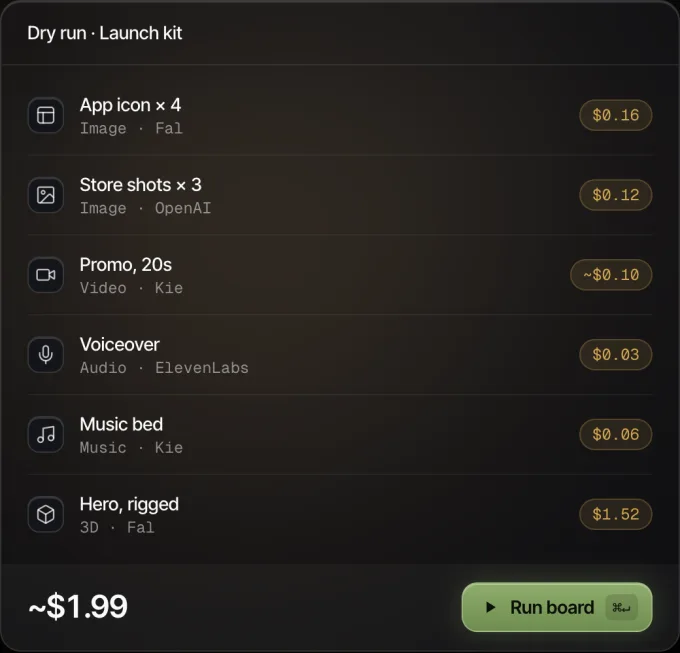
Genvas dry run of a launch kit board: six nodes with their prices, about $1.99 in all, and a Run board button.
Every node shows its price before it runs.

LoometoFree

Loometo is an open-source node canvas that runs hosted models on the provider’s hardware with your own API keys. It is free under Apache-2.0 and works on any machine that runs a browser. A zero-dependency MCP server with 11 tools lets Claude Code or another MCP agent drive it. It suits people with no GPU who want closed models such as Veo, Sora or Kling beside images, audio and 3D. It cannot load local checkpoints, LoRAs or ControlNet files, and it does not work offline.

NodeToolFree

NodeTool is a free, open-source (AGPL-3.0) workspace that pairs node-based workflows with an AI video editor and an agent. It runs on macOS, Windows and Linux. Studio can call hosted models on your own keys, and a GPU matters only if you run open-weight models locally. Claude Code can drive it through MCP, and projects are files on your disk. It suits you if you want a video timeline next to the canvas. NodeTool Cloud pricing and access can change during alpha.

WireflowFrom $36 a month

Wireflow is a browser node canvas that runs hosted models, with no local Python environment, model files or GPU to maintain. You can build for free, and a new account gets up to 60 starter credits. Ongoing runs need a paid plan, Starter at $36 a month for 2,660 credits. Its catalog includes Flux 2 Pro, Seedance, Kling and Veo, with a REST API and an MCP connector. It suits people who start from templates. ComfyUI JSON graphs, custom nodes and local checkpoints do not transfer.

RelayMeFrom $19 a month

RelayMe is a hosted node canvas that calls third-party image, video and text models, and you need only a browser. Starter is $19 a month for 20,000 credits, or you can top up as you go; 1,000 credits is about $1. It offers 7 image models and 4 video models, among them Veo 3.1 and Grok Imagine. It suits short product videos and images from a canvas. Its video list stops at four models, and there is no MCP server.

Price, platform and payment compared

The table compares all five on price, platform and how runs are paid. Figures for the other four come from their own pages as read on 10 November 2026.

Product Price Runs on How runs are paid Best for
Genvas Free (beta) Mac, Windows, Linux desktop app Your own provider keys, at provider prices Boards an agent builds, priced before each run
Loometo Free Any machine that runs a browser Your own provider keys, at provider prices A free canvas that reaches closed models
NodeTool Free macOS, Windows, Linux desktop app Your own provider keys, at provider list price Video editing with an agent in one project
Wireflow From $36 a month Browser Monthly credits Starting from workflow templates
RelayMe From $19 a month Browser Monthly credits or pay-as-you-go top-ups Short product videos and images

What carries over from a ComfyUI graph

What carries over from ComfyUI is the shape of the chain, not the file. MoodNode’s guide says a ComfyUI JSON graph does not load one-to-one into a different tool, because the node libraries do not match. A checkpoint, KSampler and VAE decode stack becomes one image node where you pick the model. A load image, upscale and save chain stays an image, upscale and output chain. An AnimateDiff or SVD video chain becomes an image node feeding a video node.

In Genvas a board is a prompt node, then a media node with a model node attached, and model settings live on the model node. Most video models take an image as the start frame and several also take an end frame, so an image made on the board can feed a video model on the same board. Check which key a model needs before you buy one: Veo 3.1 uses a fal.ai key, Kling 3.0 takes Kie.ai, Higgsfield or fal.ai, and GPT Image takes OpenAI or Kie.ai.

Which one to pick

  • Pick Genvas if you want to pay once and then pay only the providers, with no subscription; if you want Claude Code or Codex set up on install; or if you want to see what a run costs before it runs.
  • Pick Loometo if you want a free Apache-2.0 canvas that reaches closed models such as Veo, Sora and Kling on your own keys.
  • Pick NodeTool if you want a free, open-source workspace with a video timeline and an agent in the same project.
  • Pick Wireflow if you want a browser canvas where you start from templates and pay in monthly credits.
  • Pick RelayMe if you want a browser canvas with pay-as-you-go credit top-ups and an HTTP API.

Stay with ComfyUI if

ComfyUI is still the right tool in four cases.

  • Your work depends on custom nodes, your own checkpoints or LoRAs, or a ComfyUI JSON graph you want to keep.
  • Offline work, or files that must stay on your machine, point to ComfyUI too: Comfy Desktop runs entirely on your computer.
  • A capable GPU you already own makes each generation cost only electricity.
  • Comfy Cloud is the route if you want ComfyUI itself without a GPU: it runs the same node graph on hosted GPUs, with plans from $20 a month.

More comparisons & guides

Five Figma Weave alternatives without a monthly plan

Genvas, NodeTool, ComfyUI, Imaginode and Visual Sandbox compared with Figma Weave's monthly credits. Genvas is free during the beta; NodeTool and ComfyUI are free too.

Flora or Weavy alternative with no subscription: Genvas

Genvas is a Flora and Weavy alternative with no subscription. Free (beta). Also covers NodeTool, ComfyUI and Imaginode.

Make images and video in Codex with Genvas

Genvas is a desktop app for AI images and video. Connect it to Codex over MCP and see the price of each run before it starts. You pay providers directly.

Start your first board.

Add a key and make something in a minute.

Free during beta. Open source soon, under AGPL-3.0.

No subscriptionYour keys, your filesMac, Windows and Linux