AI image generators that bill per use, not monthly credits

Genvas is a desktop app for images, video, voice, music and 3D that runs on your own provider API keys, so you pay providers per generation; Genvas itself is free during the beta. Dee, who makes Genvas, wrote this list, and it is ordered by how many kinds of media one key setup covers.

Take Leonardo.Ai to design a generation visually and export the code, getimg.ai for image and video models in one request format, MuApi for text-to-image across 30+ models, or BlockRun to let an agent pay per image with no account.

Image generators on your own API keys5 alternatives
GenvasFree (beta)
Leonardo.AiPay as you go; custom plans
getimg.aiPay as you go; images from $0.015, video from $0.022 per second
MuApiPer call; flux-schnell $0.003, nano-banana $0.030
BlockRunPer image in USDC; from $0.0168
Image generators on your own API keys5 alternatives
GenvasFree (beta)
Leonardo.AiPay as you go; custom plans
getimg.aiPay as you go; images from $0.015, video from $0.022 per second
MuApiPer call; flux-schnell $0.003, nano-banana $0.030
BlockRunPer image in USDC; from $0.0168
On this page

What the list compares

The list compares five tools on the key you hold, the kinds of media each covers, what the tool itself costs, where it runs and one limit its own source states. Order is by kinds of media first, then by the models or providers a source states. Genvas is first on that measure only: images, video, voice, music and 3D on one canvas, with keys for providers including OpenAI, Google Gemini, ElevenLabs and fal.ai. Checked on 10 November 2026; the Genvas details are from version 1.3.9.

How paying per generation differs from a monthly credit plan

A monthly credit plan charges a set amount for a month’s allowance of credits. Paying per generation charges for each image, video or clip you run, at the price the provider or service lists.

Comparison at a glance

Figures for the four other tools come from their own pages, as read on that day.

Product Price Key you hold Runs on Best for
Genvas Free (beta) Your own provider keys Desktop: Mac, Windows, Linux One board for image, video, voice, music and 3D
Leonardo.Ai Pay as you go; custom plans Leonardo key Web platform and REST API Designing a generation visually, then exporting the code
getimg.ai Pay as you go; images from $0.015, video from $0.022 per second getimg.ai key Hosted API with SDKs Image and video models in one request format
MuApi Per call; flux-schnell $0.003, nano-banana $0.030 MuApi key Hosted API over HTTP 30+ text-to-image models on one endpoint
BlockRun Per image in USDC; from $0.0168 None, or a BlockRun key Hosted endpoint Agents paying per image with no account

Tools that bill per use

GenvasFree (beta)

Genvas is a desktop app that makes images, video, voiceovers, music and 3D models on a node canvas, using keys you add under Settings, Providers.

Price and licence: free during the beta. Open source soon, under AGPL-3.0. Each provider bills you directly.

Keys and models: it takes keys for OpenAI, Google Gemini, ElevenLabs, fal.ai, Kie.ai, Fish Audio, Higgsfield, xAI, OpenRouter and Sume. The model list has more than 100 models across image, video, audio and 3D. GPT Image runs on an OpenAI or Kie.ai key, and FLUX.3 on a fal.ai key. Most video models take an image as the start frame, so an image made on a board can feed a video model on the same board.

Platforms: Mac on Apple silicon, Windows 10 and 11 (x64) and Linux (.deb, x64). There is no account, and nothing is uploaded to Genvas.

Best for: making image, video, voice, music and 3D files on one board, by hand or through Claude Code, Codex or another MCP agent.

Limit: agent runs stop only at the Daily limit in Settings, Spending. The “Ask before a run costs more than” setting applies only to runs you start in the app.
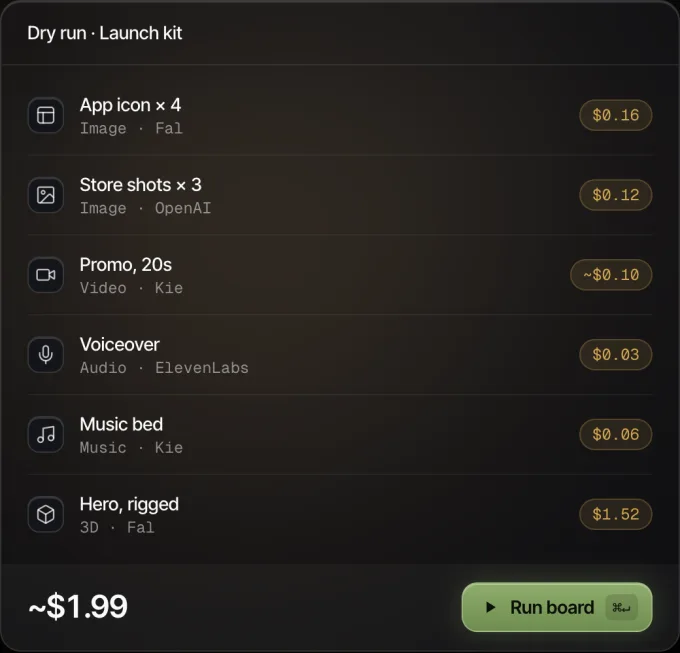
Genvas dry run of a launch kit board: six nodes with their prices, about $1.99 in all, and a Run board button.
Every node shows its price before it runs.

Leonardo.AiPay as you go; custom plans

Leonardo.Ai’s API covers image, video, 3D and audio generation in one integration, with settings designed on Leonardo’s web platform and exported as code.

Price and licence: pay as you go with no commitments and automatic top-ups, or a custom plan for higher concurrency, volume discounts and dedicated support.

Keys and models: you buy credit and create a Leonardo key. Image models include GPT-Image-2, Nano Banana 2 and Lucid Origin. Video models include Seedance 2.5, Kling 3.0 Turbo, MiniMax H3 and Wan 2.6, with Rodin V2 for 3D and Music v1 and Seed Audio 1.0 for audio.

Platforms: web platform and REST API.

Best for: designing a generation with sliders and visual controls, then shipping the exact API code.

Limit: higher concurrency needs a custom plan, which you arrange by contacting Leonardo’s team.

getimg.aiPay as you go; images from $0.015, video from $0.022 per second

getimg.ai sells a pay-as-you-go API for image and video models behind one request format.

Price and licence: no subscription and no minimum spend. Images start at $0.015 and video at $0.022 per second.

Keys and models: you create a key in the Developer Dashboard, and it is shown only once. The API lists 20 text-to-image models, including Nano Banana, Seedream, Qwen Image and GPT Image, and 17 video models, including Kling, Seedance and Wan.

Platforms: hosted API with Node.js and Python SDKs, or plain HTTP.

Best for: adding generation to a product of your own, where switching model is a one-string change.

Limit: the API is paid only, and rates differ by model and resolution.

MuApiPer call; flux-schnell $0.003, nano-banana $0.030

MuApi gives you one HTTP endpoint for 30+ text-to-image models.

Price and licence: each call is priced in credits and charged only when a generation succeeds. New accounts get free credits to try every model in the playground.

Keys and models: you send a MuApi key in the x-api-key header. Models include Flux Dev, Schnell and Kontext, Seedream, GPT-Image, HiDream, Qwen, Reve, Midjourney and Wan.

Platforms: hosted API with a playground, plus an MCP server for Claude Code, Cursor and other MCP agents.

Best for: comparing several image models in code without rewriting your client.

Limit: some models compute cost from the request payload, so their price is not a single listed figure.

BlockRunPer image in USDC; from $0.0168

BlockRun’s image generator API takes a prompt, a model and a size at one endpoint and bills per image in USDC, with the exact price quoted first.

Price and licence: no subscription. Listed prices include GPT Image 1 from $0.022, Nano Banana from $0.0535 and Nano Banana Pro from $0.106 per image.

Keys and models: no key and no account are needed on the pay-per-call route, and a team that prefers keys gets one and pays by card or invoice. Models come from OpenAI, Google, ByteDance, xAI and zai.

Platforms: hosted endpoint using the same request shape as OpenAI’s image endpoint, with Python and TypeScript SDKs and an MCP server.

Best for: an agent generating images unattended with no human signup.

Limit: the no-account route is paid in USDC from a wallet on Base, Solana or Arc.

Which one to pick

Pick Genvas if you want to pay providers directly with your own keys for image, video, voice, music and 3D on one canvas, or if you want a price shown before each run.

Pick Leonardo.Ai if you want image, video, 3D and audio models in one integration, designed visually and exported as API code.

Pick getimg.ai if you want 20 text-to-image and 17 video models in one request format, with the exact cost in every response.

Pick MuApi if you want 30+ text-to-image models on one endpoint and a charge only for successful generations.

Pick BlockRun if you want an agent or script to pay per image in USDC with no account.

More guides & comparisons

Five ComfyUI alternatives with no Python setup or GPU

Genvas, Loometo, NodeTool, Wireflow and RelayMe compared by price and platform: three free, two on credits. Written by Genvas's maker.

Five Figma Weave alternatives without a monthly plan

Genvas, NodeTool, ComfyUI, Imaginode and Visual Sandbox compared with Figma Weave's monthly credits. Genvas is free during the beta; NodeTool and ComfyUI are free too.

Genvas: images, voiceover and music from Claude Code

Genvas is a desktop app that lets Claude Code make a video's images, clips, voiceover and music, then join them. Steps, price check and fixes.

Start your first board.

Add a key and make something in a minute.

Free during beta. Open source soon, under AGPL-3.0.

No subscriptionYour keys, your filesMac, Windows and Linux