Alternatives to Krea Nodes: node canvases compared

Genvas is a desktop node canvas for AI images, video, audio and 3D, free during the beta, with no subscription. Dee, who makes Genvas, wrote this page. Take FLORA for a shared team canvas, Wireflow for repeatable workflows, or free, open-source ComfyUI for technical users who want local control.

Krea Nodes4 alternatives
GenvasFree (beta)
WireflowFrom $36 a month for 2,660 credits
FLORAFree plan; Starter $18 per seat per month
ComfyUIFree
Krea Nodes4 alternatives
GenvasFree (beta)
WireflowFrom $36 a month for 2,660 credits
FLORAFree plan; Starter $18 per seat per month
ComfyUIFree
On this page

What Krea Nodes costs

Krea Nodes arrives with the Pro plan, at $35 a month, which adds all video models plus Nodes and Apps. Basic is $9 a month and includes selected video models, and Max is $105. The yearly view showed $5, $21 and $63 per month for Basic, Pro and Max. On paid plans, compute units are a monthly allowance, and unused capacity does not accumulate.

Krea Nodes alternatives with a node canvas

GenvasFree (beta)

Genvas is a desktop app for making images, video, voiceovers, music and 3D models on a node canvas. It is free during the beta and runs on Mac, Windows and Linux.

You use your own API keys, such as OpenAI, Gemini, Fal or Kie, and pay the provider directly; Genvas adds nothing on top. Files save to a folder on your computer. It shows the price of a run before you start it, and a local MCP server lets Claude Code, Codex and other MCP agents build and run boards.

Genvas goes open source soon. If you want an open-source graph today and can self-host, take ComfyUI instead.
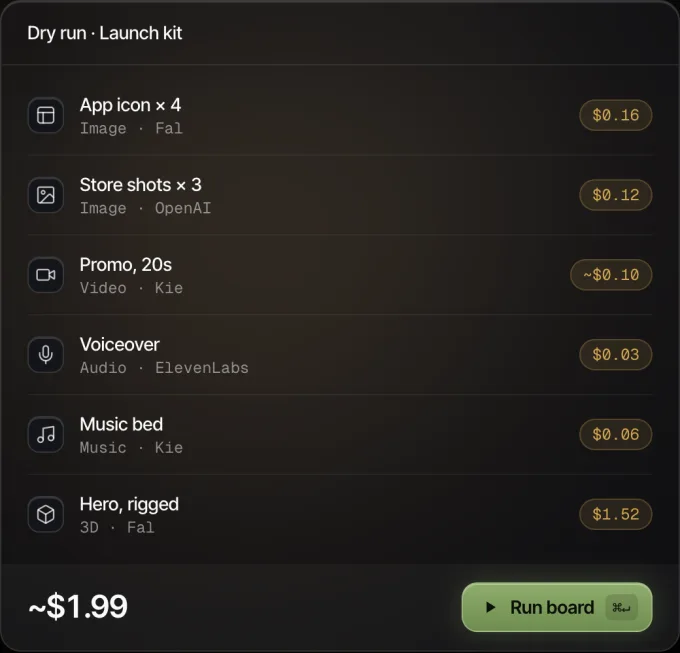
Genvas dry run of a launch kit board: six nodes with their prices, about $1.99 in all, and a Run board button.
Every node shows its price before it runs.

WireflowFrom $36 a month for 2,660 credits

Wireflow is a no-code node canvas for chaining models, with Flux 2 Pro, Recraft V4 and Nano Banana 2 among them, and image to video through Kling and Veo 3.1 nodes. Plans start at $36 a month for 2,660 credits, and a new account gets up to 60 starter credits and a free video. Its own blog says it suits teams and creators who need repeatable, multi-step image workflows at scale. Each run uses credits.

FLORAFree plan; Starter $18 per seat per month

FLORA is a collaborative node canvas. Its free plan has one seat, three active projects and limited generations. Starter is $18 per seat per month and adds image and video models, pooled usage, API access, MCP access and real-time collaboration. Pro is $50 per seat per month. It suits people who like Krea Nodes but need a shared workspace where teammates can inspect, comment on and reuse the same graph. Costs rise with seats and generation usage.

ComfyUIFree

ComfyUI is an open-source, node-based generative AI environment that runs models locally, supports custom nodes and can run workflows on managed cloud infrastructure. The software is free when self-hosted. A comparison guide recommends it for technical users who want local control. You supply the hardware, the installation, model management, updates and maintenance time. Electricity, storage and any optional cloud or API use are billed separately.

Price and payment compared

Details for Krea, Wireflow, FLORA and ComfyUI come from pages dated between 24 April 2026 and 10 November 2026.

Product Price How you pay Best for
Genvas Free (beta) Free beta, your own provider keys Node canvas on your own keys, driven by Claude Code or Codex
Wireflow From $36 a month for 2,660 credits Credit plans Repeatable multi-step image workflows
FLORA Free plan; Starter $18 per seat per month Per-seat plans Shared node canvas for teams
ComfyUI Free Self-hosted, you supply the hardware Local workflows with parameter-level control

How an agent works a Genvas board

Genvas is a visible node canvas, and an agent working on it uses the board you name or creates one. It builds a prompt node, then a media node, with a model node attached; model settings live on the model node. A note on the board holds the goal and status, and you can read it.

The agent checks outputs before it expands a batch. Draft mode previews OpenAI images cheaply, and agent runs can use OpenAI Batch at half price. For three or more icons, UI parts or sprites in one style, it makes one 4K sheet and splits it instead of running one job each. Full-screen viewers let you crop, split, upscale, trim and compose.

Genvas models and the key each one needs

Genvas 1.3.9 lists more than 100 models across image, video, audio and 3D. Image models include FLUX.3 and FLUX.2 (fal.ai key), Nano Banana (Kie.ai, Google Gemini or fal.ai key), GPT Image (OpenAI or Kie.ai key), Seedream 5 and Qwen Image 3 (Kie.ai key) and Krea v3 (fal.ai key).

Video models include Veo 3.1 (fal.ai key), Kling 3.0 (Kie.ai, Higgsfield or fal.ai key), Kling 4.0 (Kie.ai key), Seedance 2.0 and 2.5, Wan 3.0, Grok Imagine, Luma Ray 3.2, Vidu Q4, PixVerse V6 and MiniMax H3. Most video models take an image as the start frame and several also take an end frame, so an image made on the board can feed a video model on the same board.

Audio covers ElevenLabs and Fish Audio voices, Gemini text to speech, Suno v6 and ElevenLabs Music for music, and sound effects models. 3D covers Meshy, Tripo, Hunyuan 3D, Rodin and Trellis (fal.ai key). Upscaling and background removal run through a Kie.ai key.

Which one to pick

  • Pick Genvas if you want to pay once and pay providers directly with your own keys, if you want every file saved to a folder on your computer, or if you want Claude Code or Codex to build and run boards.
  • Pick Wireflow if you want repeatable multi-step image workflows on a no-code canvas, paid for in credits.
  • Pick FLORA if your team needs a shared canvas where teammates can inspect, comment on and reuse the same graph.
  • Pick ComfyUI if you want free software with local control and can supply the hardware, installation and maintenance yourself.

Stay with Krea Nodes if

Stay with Krea Nodes if any of these describes your work.

  • Krea’s generation and enhancement tools already anchor your process.
  • You use App Builder or the Nodes Agent, which Krea lists alongside Nodes.
  • You train LoRAs, or work with Krea 2 and Krea 1, its in-house models.
  • You work in Krea’s real-time generation interface, or you upscale on paid tiers up to 22K with Topaz Standard.

More comparisons & guides

Price per AI image and video run on Kie.ai and fal.ai keys

Video clips $0.14 to $2.37 and images $0.004 to $0.15 across Kling, Seedance, Veo, FLUX and more, estimated in Genvas 1.3.9 on 10 November 2026.

Chain image, upscale and video in Genvas with your agent

Genvas is a desktop node canvas where your coding agent builds an image, upscale and video board. Free during beta.

Best AI canvas apps for Mac, compared for images and video

Eight AI canvas apps compared by price, platform and models. Genvas, written by its maker, ranks first and is free during the beta; OpenCanvas AI is free.

Start your first board.

Add a key and make something in a minute.

Free during beta. Open source soon, under AGPL-3.0.

No subscriptionYour keys, your filesMac, Windows and Linux